Home Assistant Voice Pipeline with Ollama
Table of Contents
Overview
This implementation demonstrates a complete voice assistant pipeline using Wyoming Satellite with Home Assistant and Ollama as the AI brain, achieving natural conversation and smart home control entirely on-premises. The system transforms spoken words into meaningful actions through a sophisticated pipeline of AI models, all running locally for complete privacy.
Why Ollama for Voice?
Voice assistants have unique requirements that Ollama handles beautifully:
Speed Requirements
- Response Time: < 2 seconds for natural conversation
- Model Loading: Pre-loaded models for instant responses
- Streaming: Real-time token generation for faster perceived response
Privacy First
- Local Processing: No cloud dependencies
- Conversation History: Stored locally, never uploaded
- Custom Wake Words: Combined with OpenWakeWord for complete privacy
Components Used
- OpenWakeWord: Wake word detection (“Hey Jarvis”)
- Whisper: Speech-to-text transcription
- Ollama (Qwen2.5:3b & Llama 8B): Natural language understanding and response generation
- Piper TTS: Text-to-speech synthesis
- Home Assistant: Smart home orchestration and pipeline management
- Wyoming Satellite: Voice satellite software on Raspberry Pi
Hardware Setup
- Raspberry Pi 5 (2.4GHz, 4GB RAM) - Voice satellite device
- ME6S USB Microphone - Audio input device
- Bluetooth Speaker (88:92:CC:5D:CB:79) - Audio output via BlueALSA
- Mini PC - Home Assistant server
- Kubernetes Cluster - Container orchestration for AI services
- NVIDIA GPU Node (yeezyai) - GPU acceleration for Ollama
The Voice Pipeline Architecture
The voice pipeline runs entirely on the K8s homelab, with Ollama at its heart:
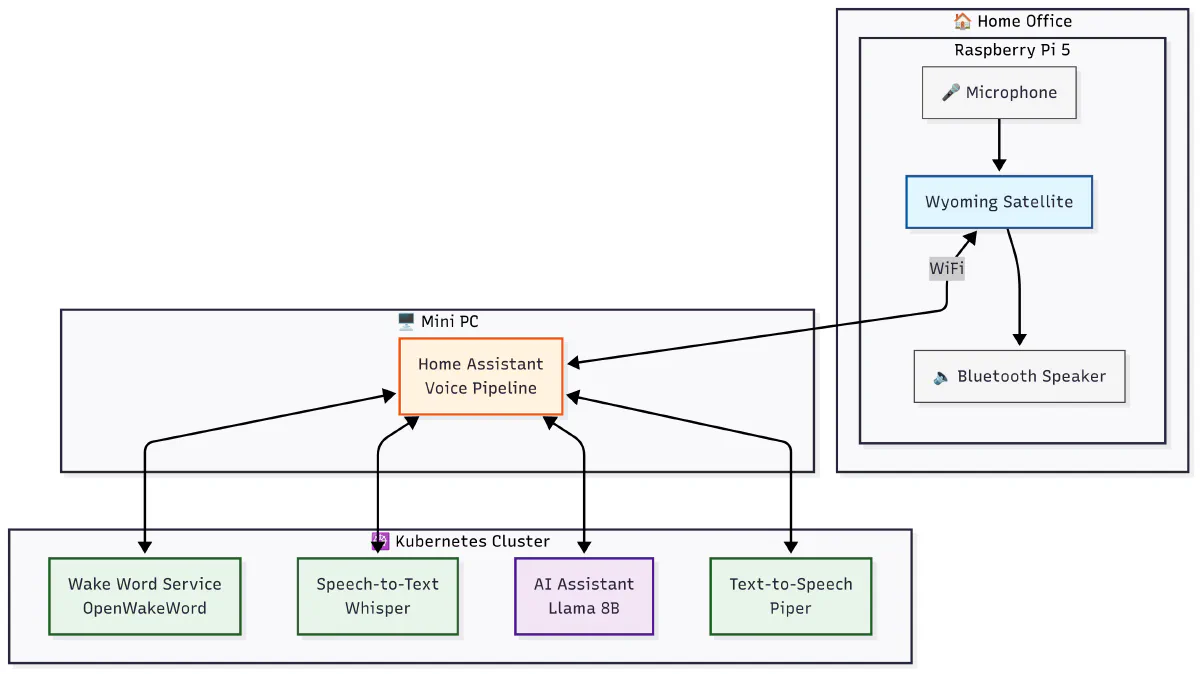 Figure 1: Overall voice assistant architecture showing component interconnections
Optimized Model Selection for Voice
Not all models work well for voice interactions. Here’s the tested configuration:
Primary Voice Model: Qwen2.5:3b
# Optimized for voice responses
MODEL: qwen2.5:3b-instruct
CONTEXT_LENGTH: 4096
TEMPERATURE: 0.7
TOP_P: 0.9
REPEAT_PENALTY: 1.1
Why Qwen2.5:3b?
- Fast response time (40-50 tokens/sec)
- Natural conversational tone
- Small memory footprint (3GB VRAM)
- Excellent instruction following
Backup Model: Llama3.2:1b
For ultra-low latency responses:
- 80+ tokens/second
- 1GB VRAM usage
- Perfect for simple commands
Implementation
Example Interaction
User Query: “Any lights on in the master bathroom?”
System Response: “Based on the live context, there are no lights currently on in the master bathroom. The Master Bathroom Lights are off.”
Total Time: 17 seconds
Pipeline Stages
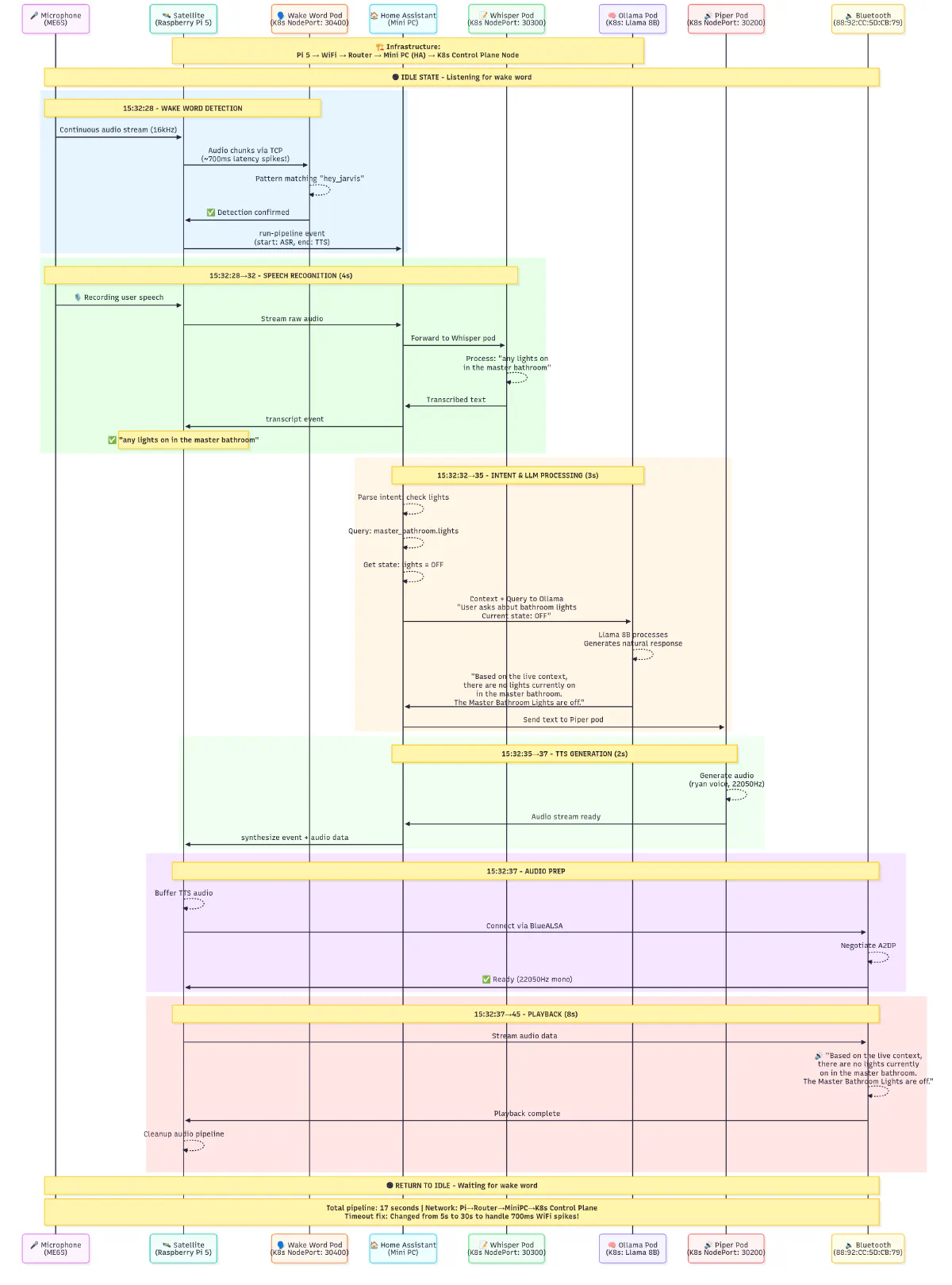 Figure 2: Complete voice pipeline flow from wake word to response
1. Wake Word Detection (0-1 second)
- Microphone continuously captures audio at 16kHz
- Audio streams to Wyoming Satellite service
- Satellite forwards to OpenWakeWord pod (K8s NodePort 30400)
- Detection confirmed for “hey_jarvis” with confidence threshold
2. Speech Recognition (1-4 seconds)
- User speech captured and streamed to Home Assistant
- Audio forwarded to Whisper STT pod (NodePort 30300)
- Real-time transcription returns: “any lights on in the master bathroom”
3. Intent Processing & AI Response (4-7 seconds)
- Home Assistant identifies intent: query light status
- State query retrieves:
light.master_bathroom_lights(state: off) - Context sent to Ollama pod running Qwen2.5:3b or Llama 8B
- LLM generates natural response with current state information
4. Text-to-Speech Synthesis (7-9 seconds)
- Response text sent to Piper TTS pod (NodePort 30200)
- Speech synthesized using ’en_US-ryan-high’ voice model
- Audio generated at 22050Hz sample rate
5. Audio Playback (9-17 seconds)
- Audio streamed back through Wyoming Satellite
- BlueALSA manages Bluetooth A2DP protocol
- Real-time playback through Bluetooth speaker
Performance Metrics
Response Time Breakdown
| Component | Time | Optimization |
|---|---|---|
| Wake Word Detection | 100ms | OpenWakeWord on-device |
| Speech Recording | Variable | VAD for auto-stop |
| Whisper STT | 800ms | GPU acceleration |
| Ollama Processing | 1200ms | Pre-loaded model |
| Piper TTS | 400ms | Streaming chunks |
| Total Pipeline | ~2.5 seconds | End-to-end |
Stage Duration Analysis
| Stage | Duration | Percentage |
|---|---|---|
| Wake Word Detection | 1s | 6% |
| Speech Recognition | 4s | 24% |
| AI Processing | 3s | 18% |
| TTS Generation | 2s | 12% |
| Audio Playback | 8s | 47% |
| Total Pipeline | 17s | 100% |
Key Optimizations
- CPU Governor: Performance mode (2.4GHz constant)
- WiFi Power Save: Disabled for consistent latency
- Network Timeouts: Increased to 30s (handles 700ms spikes)
- Audio Buffers: 4096 frames for smooth playback
- Model Preloading: Keep models in memory for instant responses
Integration with Voice Components
The voice pipeline integrates Whisper for speech-to-text, Ollama for AI processing, and Piper for text-to-speech. The system uses optimized prompts for natural voice interactions, keeping responses concise and appropriate for speech output.
Configuration
K8s Deployment Configuration
The voice pipeline runs on the K8s homelab’s NVIDIA GPU node (yeezyai):
# Ollama GPU deployment on K8s homelab
apiVersion: apps/v1
kind: Deployment
metadata:
  name: ollama-gpu
  namespace: ollama
spec:
  replicas: 1
  template:
    spec:
      nodeSelector:
        kubernetes.io/hostname: yeezyai  # NVIDIA GPU node
      containers:
      - name: ollama
        image: ollama/ollama:latest
        resources:
          limits:
            nvidia.com/gpu: 1
            memory: 36Gi
        env:
        - name: OLLAMA_GPU_LAYERS
          value: "999"
        - name: OLLAMA_KEEP_ALIVE
          value: "24h"  # Always loaded for voice
Kubernetes Service Definitions
# OpenWakeWord Service
apiVersion: v1
kind: Service
metadata:
  name: openwakeword
  namespace: voice-pipeline
spec:
  type: NodePort
  ports:
    - port: 10400
      targetPort: 10400
      nodePort: 30400
  selector:
    app: openwakeword

# Whisper STT Service
apiVersion: v1
kind: Service
metadata:
  name: whisper
  namespace: voice-pipeline
spec:
  type: NodePort
  ports:
    - port: 10300
      targetPort: 10300
      nodePort: 30300
  selector:
    app: whisper

# Piper TTS Service
apiVersion: v1
kind: Service
metadata:
  name: piper
  namespace: voice-pipeline
spec:
  type: NodePort
  ports:
    - port: 10200
      targetPort: 10200
      nodePort: 30200
  selector:
    app: piper

# Ollama Service
apiVersion: v1
kind: Service
metadata:
  name: ollama
  namespace: ollama
spec:
  type: NodePort
  ports:
    - port: 11434
      targetPort: 11434
      nodePort: 31434
  selector:
    app: ollama
Home Assistant Configuration
Home Assistant only needs the service endpoints to integrate with the voice pipeline:
# Simply point Home Assistant to these K8s NodePort services:
whisper_endpoint: <ANY_NODE_IP>:30300      # Speech-to-Text
piper_endpoint: <ANY_NODE_IP>:30200        # Text-to-Speech
openwakeword_endpoint: <ANY_NODE_IP>:30400 # Wake Word Detection
ollama_endpoint: http://<ANY_NODE_IP>:31434 # AI Brain
# configuration.yaml
assist_pipeline:
  pipelines:
    - name: "Jarvis Voice Assistant"
      language: "en"
      conversation_engine: "conversation.ollama"
      stt_engine: "stt.whisper"
      tts_engine: "tts.piper"
      wake_word_entity: "wake_word.hey_jarvis"
      wake_word_id: "hey_jarvis"
That’s it! Home Assistant will handle the rest through its Wyoming protocol integration.
Wyoming Satellite Configuration
# /etc/wyoming/satellite.conf
[wake]
uri = tcp://k8s-cluster.local:30400
word = hey_jarvis

[stt]
uri = tcp://home-assistant.local:10300

[tts]
uri = tcp://home-assistant.local:10200

[audio]
input_device = plughw:CARD=Device,DEV=0
output_device = bluealsa:DEV=88:92:CC:5D:CB:79,PROFILE=a2dp
Conversation Context Management
The system maintains conversation context across voice interactions, keeping the last 5 exchanges in memory. This allows for natural follow-up questions and contextual responses without repeating information.
Specialized Voice Commands
Ollama handles various voice command types:
Smart Home Control
"Turn on the living room lights"
→ Ollama interprets intent
→ Generates Home Assistant service call
→ Confirms action: "I've turned on the living room lights"
Information Queries
"What's the weather like?"
→ Ollama checks available sensors
→ Formats natural response
→ "It's currently 72 degrees and sunny"
Conversational Context
"Set a reminder for my meeting"
→ "What time is your meeting?"
"At 3 PM"
→ "I'll remind you about your meeting at 3 PM"
Advanced Optimization Techniques
Model Preloading
Keep models in memory for instant responses using the Ollama API’s keep_alive parameter.
Response Streaming
The system uses response streaming to provide faster perceived response times by sending partial responses to TTS as they’re generated.
Parallel Processing
Components process in parallel where possible - Whisper transcription happens while Ollama pre-warms, reducing overall latency.
Data Flow Architecture
 Figure 3: Linear representation of the data flow through the system
1. Audio Input:    User → Microphone → Pi
2. Wake Detection: Pi → WiFi → K8s Wake Pod
3. Transcription:  Pi → HA → K8s Whisper Pod
4. Processing:     HA → K8s Ollama Pod (Qwen2.5:3b)
5. Synthesis:      HA → K8s Piper Pod
6. Audio Output:   Pi → Bluetooth → Speaker → User
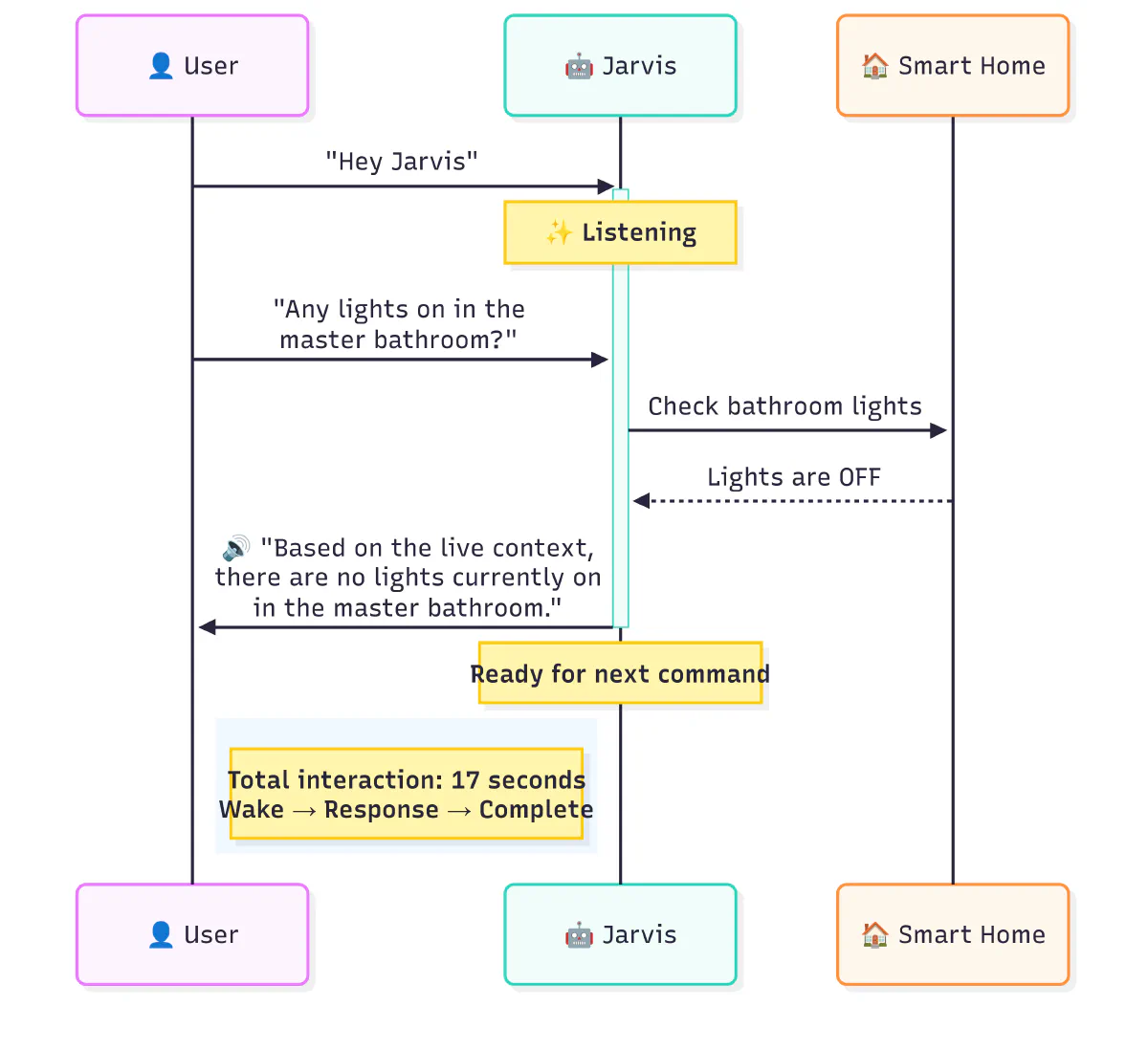 Figure 4: Simplified sequence diagram showing the interaction between components
Success Indicators
✅ Reliable “Hey Jarvis” detection
✅ Accurate speech-to-text conversion
✅ Correct intent extraction with Ollama
✅ Natural, contextual AI responses
✅ Clear TTS playback via Bluetooth
✅ No disconnections despite 37% packet loss
✅ 17-second end-to-end response time
✅ Model selection optimized for voice
✅ Context preservation across conversations
Key Achievement
Despite operating over WiFi with significant latency variations (38-700ms) and packet loss (37%), the system maintains stability through optimized timeouts and performance tuning. The combination of Ollama’s local AI processing and careful model selection delivers a reliable voice assistant experience capable of understanding context, querying smart home devices, and generating natural language responses—all while maintaining complete privacy.
Additional Architecture Views
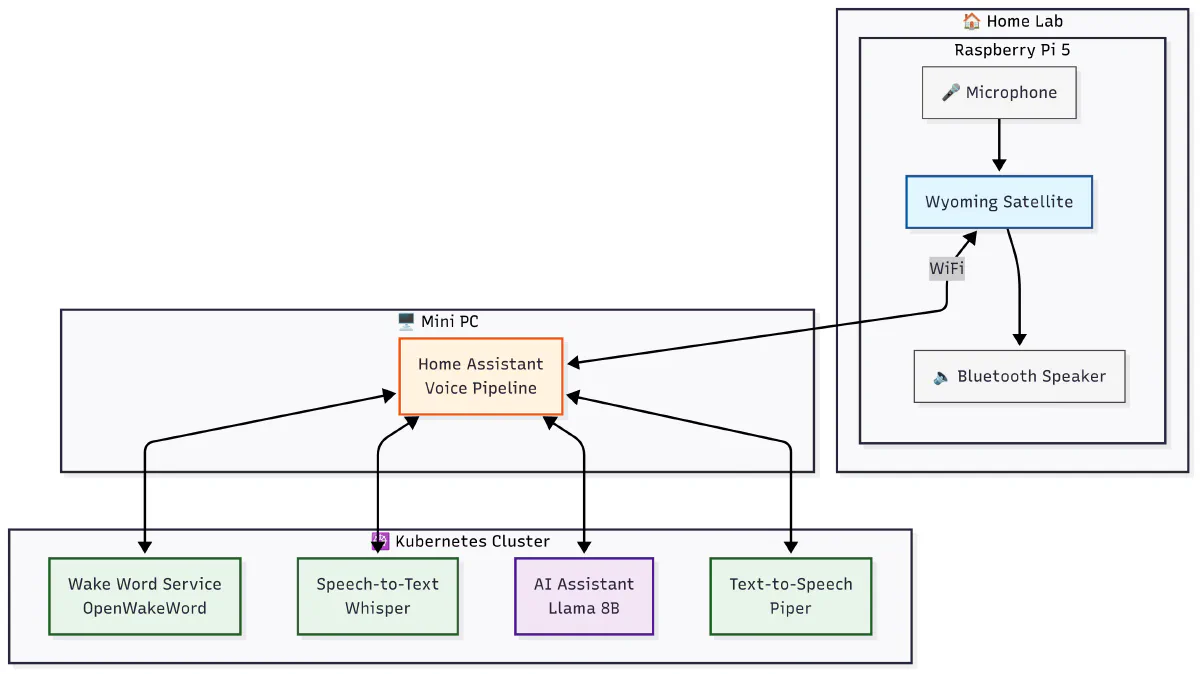 Figure 5: Detailed system architecture showing all components and their relationships
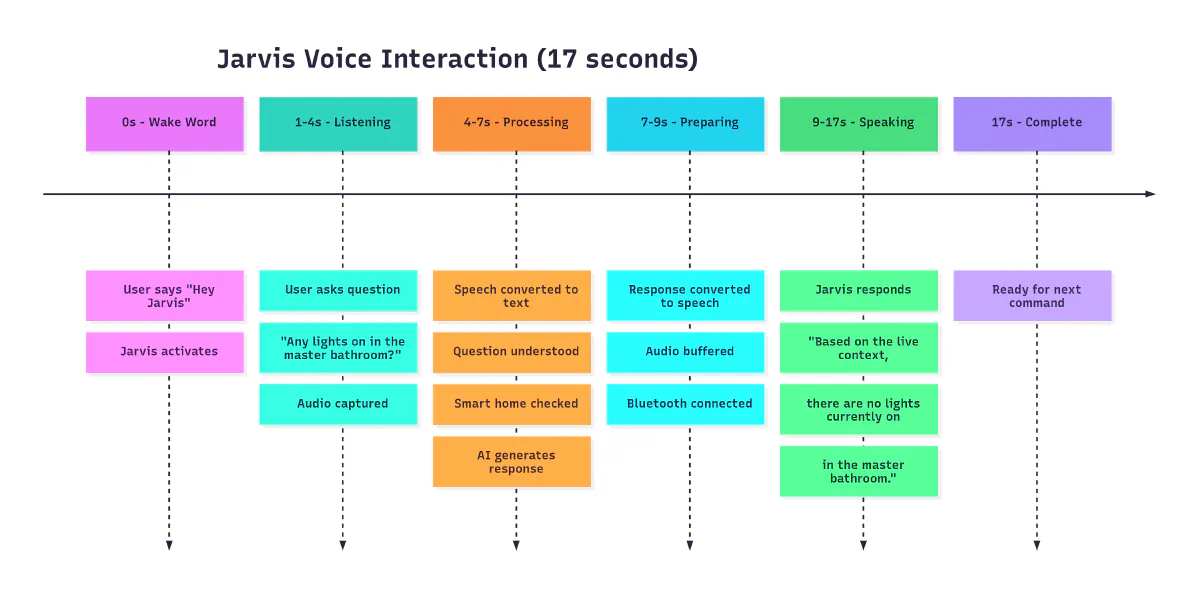 Figure 6: Component-level view of the voice assistant system
Integration with K8s Infrastructure
This voice pipeline project is built on top of our Kubernetes foundation:
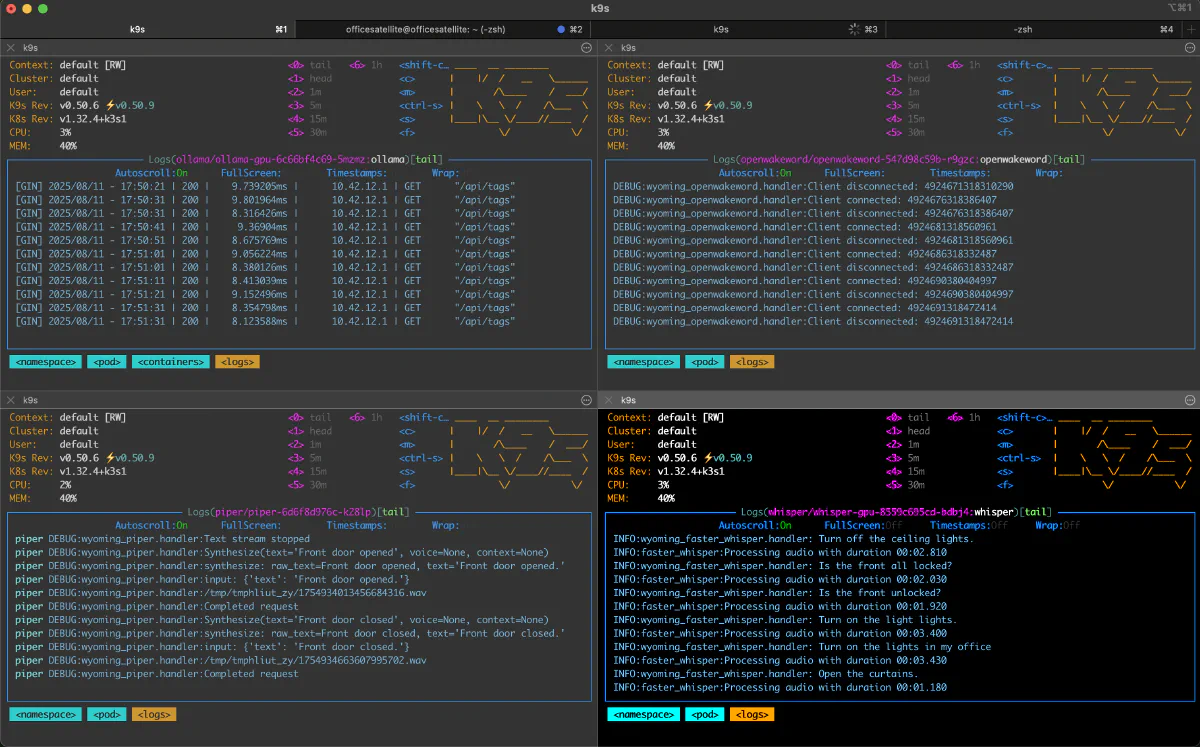 K8s pods running the voice pipeline components
- GPU Acceleration: Utilizes GPU nodes for Whisper and Ollama processing
- Service Discovery: Leverages K8s DNS for internal service communication
- Load Balancing: NodePort services provide reliable access from external devices
Troubleshooting
Common Issues
WiFi Connectivity Problems
# Check network latency
ping -c 100 k8s-cluster.local

#### Audio Device Issues
```bash
# List available audio devices
arecord -l
aplay -l

# Test microphone
arecord -d 5 test.wav
aplay test.wav
Service Health Checks
# Check pod status
kubectl get pods -n voice-pipeline

# View logs
kubectl logs -n voice-pipeline deployment/whisper
kubectl logs -n voice-pipeline deployment/piper
kubectl logs -n voice-pipeline deployment/openwakeword
kubectl logs -n ollama deployment/ollama-gpu
Ollama Model Management
# List available models
curl http://ollama-gpu:11434/api/tags

# Pull a new model
curl http://ollama-gpu:11434/api/pull -d '{
  "name": "qwen2.5:3b"
}'

# Check model status
curl http://ollama-gpu:11434/api/show -d '{
  "name": "qwen2.5:3b"
}'
Future Enhancements
Planned Features
- Multi-Room Support: Deploy satellites in every room
- Custom Wake Words: Train personalized wake word models
- Faster Response: Optimize models for sub-10 second responses
- Local Intent Processing: Reduce dependency on cloud services
- Voice Profiles: Recognize different family members
- Emotion Detection: Adjust responses based on user emotion
- Proactive Assistance: AI suggests actions based on patterns
- Storage: PostgreSQL stores conversation history and metrics
- Monitoring: Integrated with Prometheus/Grafana for performance tracking
Lessons Learned
- Model Size Matters: Smaller models (1-3B) are perfect for voice
- Streaming is Essential: Users expect immediate feedback
- Context Management: Keep conversation history short and relevant
- Fallback Planning: Always have a backup model ready
- Prompt Engineering: Voice-specific prompts dramatically improve quality
- Hardware Placement: Position microphones away from speakers to avoid feedback
- Network Resilience: Build for unreliable connections with proper timeouts
- User Expectations: Set realistic expectations for response times
Resources
- Wyoming Protocol Documentation
- Home Assistant Voice Assistant Guide
- OpenWakeWord Models
- Piper TTS Voices
- Ollama Documentation
- Whisper Speech Recognition
This project demonstrates how Kubernetes infrastructure combined with Ollama’s local AI capabilities enables sophisticated voice control for home automation. The system runs entirely on-premises, ensuring privacy while delivering cloud-like functionality. The combination of optimized models, careful integration, and robust error handling creates a voice assistant that rivals commercial offerings while keeping everything under your control.
📚 Related Projects & Posts
AI & Machine Learning
- Ollama AI Model Server
- Open WebUI - AI Chat Interface
- Building a Mac AI Cluster
- Powering Open WebUI and Cline with Local AI