Powering My Voice Assistant with Ollama: Local AI for Home Automation
Table of Contents
Ollama has become the AI brain of my home automation infrastructure, powering my voice assistant pipeline and Home Assistant integrations. Running entirely on-premises on my NVIDIA GPU node, it enables natural language understanding and intelligent responses while maintaining complete privacy and control.
The Home Automation AI Hub
My Ollama deployment serves as the AI intelligence layer for home automation:
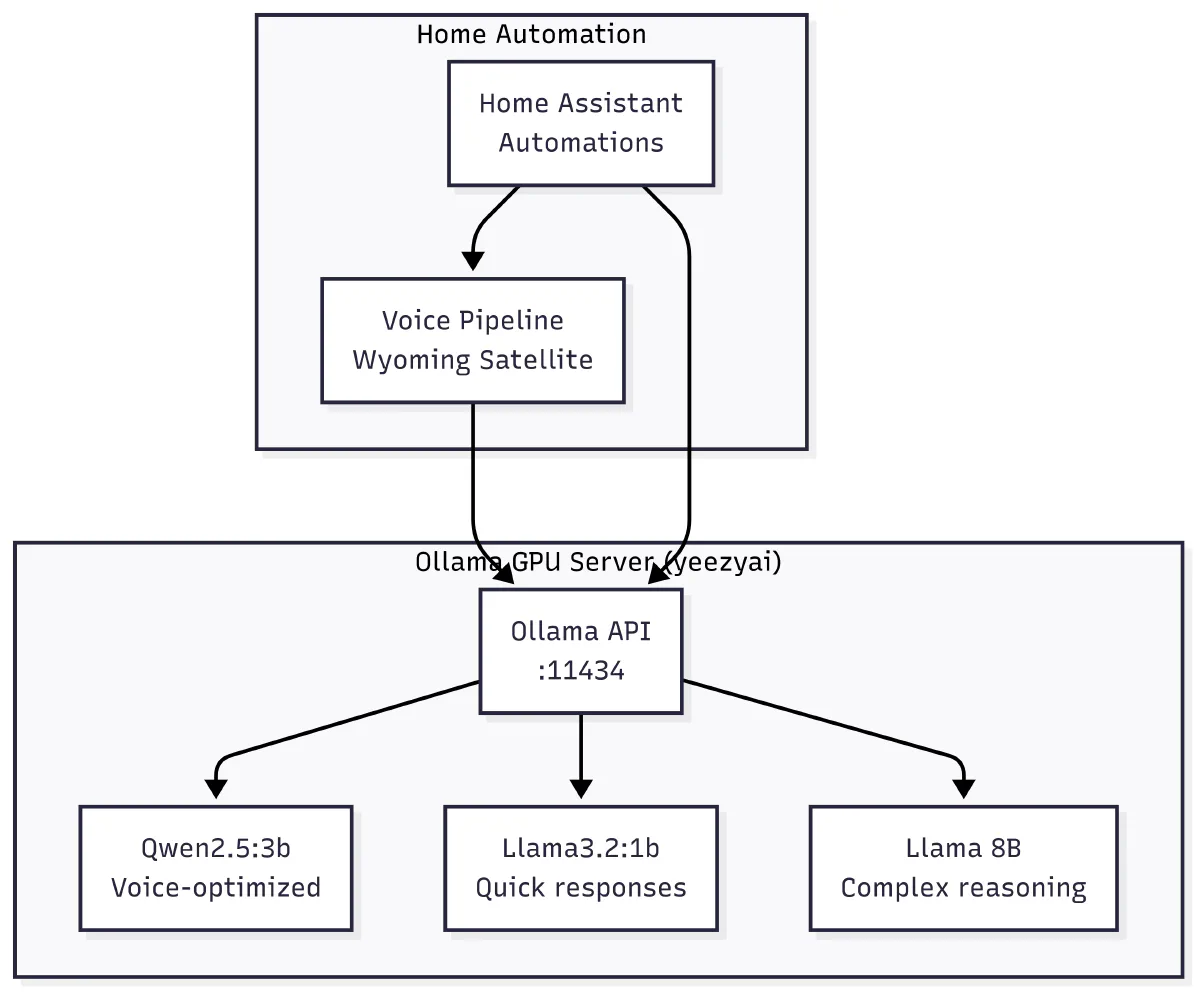 Ollama serves as the AI brain for voice pipeline and Home Assistant automations
Core Applications Powered by Ollama
1. Voice Assistant Intelligence
My Voice Pipeline project uses Ollama as its brain, processing natural language and generating responses for my home assistant. The entire voice interaction—from speech recognition to intelligent response—happens locally with sub-3-second response times.
Key Features:
- Natural conversation with context awareness
- Smart home device control through voice
- Custom system prompts for voice-optimized responses
- Model selection based on complexity (Qwen2.5:3b for speed, Llama 8B for complex queries)
- Real-time streaming for faster perceived response
2. Home Assistant Automations
Ollama integrates directly with Home Assistant to provide intelligent automation:
- Natural language command processing
- Context-aware responses based on home state
- Smart decision-making for complex automation rules
- Intent recognition and action execution
Infrastructure Setup
GPU-Accelerated Deployment
Ollama runs on my NVIDIA GPU node (yeezyai) in the K8s cluster:
apiVersion: apps/v1
kind: Deployment
metadata:
  name: ollama-gpu
  namespace: ollama
spec:
  replicas: 1
  template:
    spec:
      nodeSelector:
        kubernetes.io/hostname: yeezyai
      containers:
      - name: ollama
        image: ollama/ollama:latest
        resources:
          limits:
            nvidia.com/gpu: 1
            memory: 36Gi
        env:
        - name: OLLAMA_GPU_LAYERS
          value: "999"
        - name: OLLAMA_KEEP_ALIVE
          value: "24h"
        ports:
        - containerPort: 11434
Model Management Strategy
I maintain different models optimized for home automation:
| Model | Size | Use Case | Performance |
|---|---|---|---|
| Qwen2.5:3b | 3GB | Primary voice responses | 40-50 tokens/sec |
| Llama3.2:1b | 1GB | Simple commands | 80+ tokens/sec |
| Llama 8B | 8GB | Complex reasoning | 20-30 tokens/sec |
API Access Configuration
All services access Ollama through its REST API:
import requests
import json

class OllamaClient:
    def __init__(self, host="http://ollama-gpu.ollama.svc.cluster.local:11434"):
        self.host = host

    def generate(self, model, prompt, system=None):
        payload = {
            "model": model,
            "prompt": prompt,
            "stream": False
        }
        if system:
            payload["system"] = system

        response = requests.post(
            f"{self.host}/api/generate",
            json=payload
        )
        return response.json()["response"]

    def chat(self, model, messages):
        response = requests.post(
            f"{self.host}/api/chat",
            json={
                "model": model,
                "messages": messages,
                "stream": False
            }
        )
        return response.json()["message"]["content"]
Performance Optimization
Model Preloading
Keep frequently used models in memory:
# Preload models on startup
for model in qwen2.5:3b llama3.2:1b mistral:7b; do
    curl http://ollama-gpu:11434/api/generate -d "{
        \"model\": \"$model\",
        \"keep_alive\": \"24h\"
    }"
done
Request Routing
Home automation requests get routed to appropriate models:
def select_model(request_type, complexity):
    """Route requests to optimal models for home automation"""
    if request_type == "voice":
        if complexity == "simple":
            return "llama3.2:1b"  # Quick commands
        elif complexity == "complex":
            return "llama:8b"     # Complex reasoning
        else:
            return "qwen2.5:3b"   # Default voice model
    elif request_type == "automation":
        if complexity == "complex":
            return "llama:8b"     # Complex automation logic
        else:
            return "qwen2.5:3b"   # Standard automations
    return "qwen2.5:3b"          # Default model
Resource Management
Monitor and manage GPU resources:
# Check GPU utilization
nvidia-smi

# Monitor Ollama memory usage
curl http://ollama-gpu:11434/api/ps

# List loaded models
curl http://ollama-gpu:11434/api/tags
Security & Privacy
Network Isolation
Ollama is only accessible within the cluster:
apiVersion: v1
kind: Service
metadata:
  name: ollama-internal
  namespace: ollama
spec:
  type: ClusterIP  # Internal only
  ports:
  - port: 11434
    targetPort: 11434
  selector:
    app: ollama
Access Control
Applications authenticate through service accounts:
apiVersion: v1
kind: ServiceAccount
metadata:
  name: ollama-client
  namespace: default
---
apiVersion: rbac.authorization.k8s.io/v1
kind: Role
metadata:
  name: ollama-access
  namespace: ollama
rules:
- apiGroups: [""]
  resources: ["services"]
  verbs: ["get"]
Monitoring & Observability
Prometheus Metrics
# Ollama metrics exporter
apiVersion: v1
kind: ConfigMap
metadata:
  name: ollama-metrics
data:
  metrics.py: |
    import prometheus_client
    import requests
    import time

    # Define metrics
    models_loaded = prometheus_client.Gauge(
        'ollama_models_loaded',
        'Number of models currently loaded'
    )
    request_duration = prometheus_client.Histogram(
        'ollama_request_duration_seconds',
        'Time spent processing requests'
    )

    # Collect and expose metrics
    while True:
        ps_data = requests.get("http://ollama:11434/api/ps").json()
        models_loaded.set(len(ps_data.get("models", [])))
        time.sleep(30)
Grafana Dashboard
Monitor key metrics:
- Model load times
- Request latency by model
- Token generation rates
- GPU utilization
- Memory usage per model
Cost Savings
Running Ollama locally for home automation has eliminated cloud dependencies:
| Service | Monthly Cost | Local Alternative |
|---|---|---|
| Google Assistant API | $50+ | Ollama + Voice Pipeline |
| OpenAI GPT-3.5 | $30+ | Qwen2.5:3b |
| Cloud TTS/STT | $20+ | Local Whisper + Piper |
| Total Savings | $100+/month | One-time hardware cost |
Lessons Learned
- Model Selection is Critical: Not all models are equal—choose based on your specific use case
- Memory Management: Keep only essential models loaded to avoid OOM errors
- Prompt Engineering: Spend time crafting system prompts for each application
- Streaming Responses: Always use streaming for better perceived performance
- Fallback Models: Have smaller models ready as fallbacks for when larger ones fail
- Context Windows: Manage conversation history carefully to stay within limits
Future Enhancements
- Fine-tuning: Custom models trained on my home automation patterns
- Multi-Room Support: Deploy Ollama on edge devices for each room
- Voice Profiles: Personalized responses for different family members
- Predictive Automation: Learn patterns and suggest automations
- Vision Models: Add camera integration for visual context
Conclusion
Ollama has transformed my home automation from basic rule-based systems to intelligent, conversational control. The combination of voice pipeline integration and Home Assistant automations creates a truly smart home that understands natural language and responds intelligently—all while keeping everything private and local.
The key to success has been optimizing for the specific needs of home automation: fast response times, natural conversation flow, and reliable fallbacks. Running on my NVIDIA GPU node ensures consistent performance while maintaining complete control over my data.
For detailed implementation and configuration:
- Voice Pipeline Project - Complete voice assistant implementation with Ollama
- Ollama Project Page - Installation and configuration guide
- Home Assistant Integration Guide - Setting up AI-powered automations
For broader AI infrastructure topics, see:
- Open WebUI and Cline with Local AI - Chat interfaces and development tools (using different AI backends)
- Mac AI Cluster - Distributed AI infrastructure for other applications