Powering Open WebUI and Cline with GPUStack: My AI Infrastructure Journey
Table of Contents
After building my Mac AI cluster, I needed a way to make it accessible to all my tools. The journey took me through several frameworks before landing on the perfect solution: GPUStack providing an OpenAI-compatible API that seamlessly integrates with everything.
The Evolution: Finding the Right Framework
The Journey
My path to the current setup wasn’t straightforward:
- MLX Distributed Computing: Started here for model training and local inference on Apple Silicon
- Exo Labs: Experimented with this promising framework, but pivoted when the community began a redesign
- GPUStack: The solution that finally clicked - providing OpenAI-compatible endpoints that work with everything
The Current Architecture
Here’s how my AI infrastructure actually works:
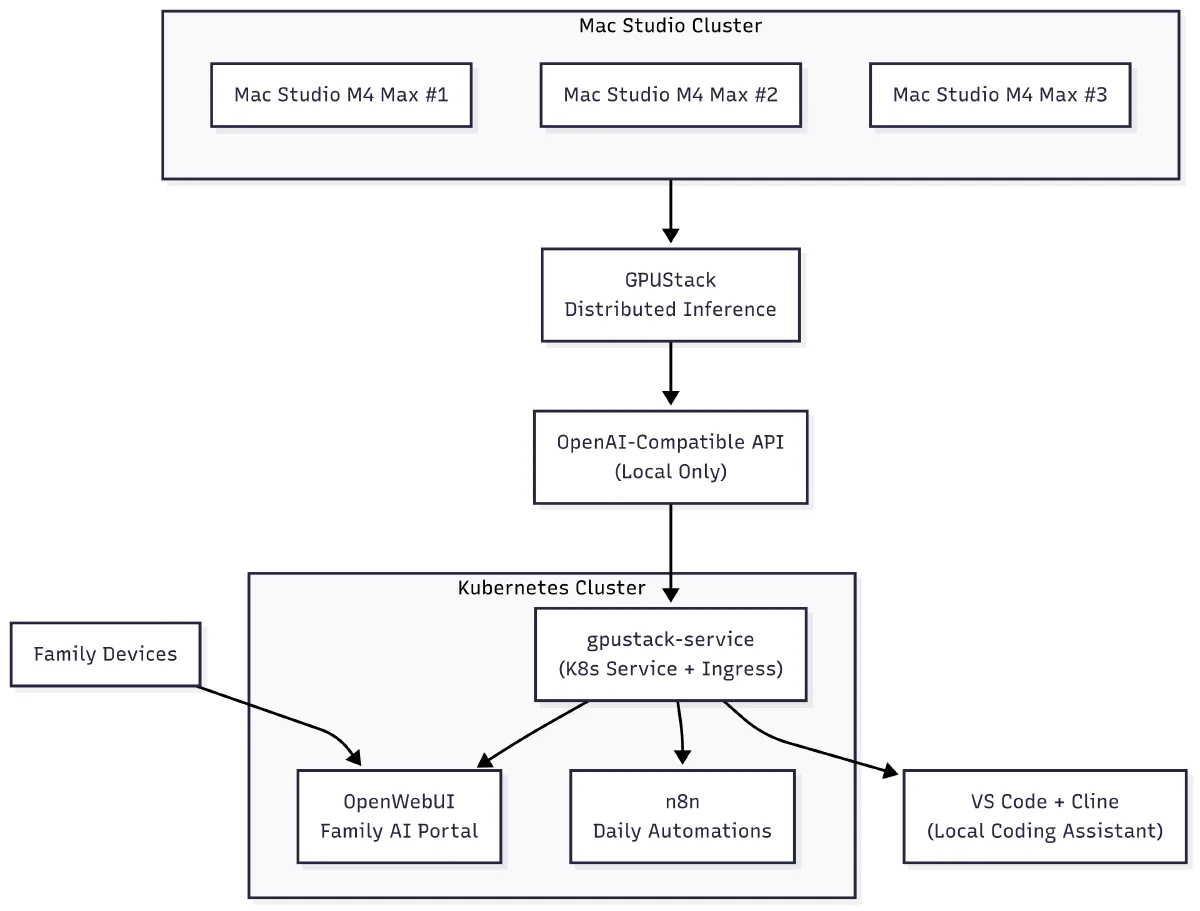
The architecture shows the complete flow from Mac hardware through GPUStack to end-user applications, with Kubernetes providing the orchestration layer that makes everything accessible and manageable.
GPUStack: The Game Changer
Why GPUStack Won
GPUStack became my framework of choice because:
- OpenAI Compatibility: Drop-in replacement for OpenAI API
- Multi-Backend Support: Works with various GPU types
- Kubernetes Native: Designed for container orchestration
- Simple Management: Web UI for model management
- Production Ready: Stable and reliable
The Setup Process
Setting up the infrastructure involved two separate systems:
Bare Metal Mac Cluster with GPUStack
- Installed GPUStack directly on each Mac (no K8s)
- Configured to recognize Apple Silicon GPUs
- Set up model storage paths on local SSDs
- Running on bare metal for maximum performance
K8s GPU Proxy for HTTPS
- Created
gpu-proxynamespace on K8s homelab - Wraps the bare metal GPUStack endpoints
- Provides HTTPS access required by tools like Cline and n8n
- Single ingress point for all applications
- Created
Separate Ollama GPU Deployment on K8s
- Dedicated Ollama pod running on K8s homelab
- Uses NVIDIA GPU node for voice pipeline
- Direct integration with Home Assistant
- Completely separate from Mac cluster
Integration: Open WebUI
The Connection
Open WebUI connects directly to the GPUStack endpoint through the Kubernetes proxy:
# Simplified deployment
apiVersion: apps/v1
kind: Deployment
metadata:
  name: open-webui
  namespace: ai-apps
spec:
  template:
    spec:
      containers:
      - name: open-webui
        env:
        - name: OPENAI_API_BASE
          value: "http://gpu-proxy.gpu-proxy.svc.cluster.local/v1"
        - name: OPENAI_API_KEY
          value: "sk-local-key"  # GPUStack doesn't require real keys
The Experience
With GPUStack backend, Open WebUI feels just like ChatGPT:
- Model switching is seamless
- Response streaming works perfectly
- Multiple conversations handled concurrently
- All data stays local
Cline + VS Code Integration
The Setup
Cline configuration is minimal with GPUStack:
{
  "cline.apiProvider": "openai",
  "cline.openaiBaseUrl": "http://gpu-proxy.local/v1",
  "cline.openaiApiKey": "sk-local",
  "cline.openaiModelId": "auto"
}
That’s it! GPUStack handles model routing automatically.
The Development Experience
Code Completion: Instant suggestions without internet dependency Refactoring: Complex changes with full codebase context Documentation: Generate docs that match my style Debugging: AI pair programming that understands my stack
n8n Automation
Workflow Integration
n8n connects to the same GPUStack endpoint, enabling:
- Email Processing: Summarize and categorize incoming mail
- Content Generation: Automated blog post drafts
- Data Analysis: Process logs and generate reports
The Power of Local AI Automation
Having unlimited API calls means I can:
- Process every piece of data through AI
- Create complex multi-step workflows
- Never worry about rate limits or costs
The Voice Pipeline: K8s Ollama Deployment
Completely Separate Infrastructure
The voice pipeline runs on a dedicated Ollama GPU deployment in the K8s homelab, not on the Mac cluster
Why Separate from Mac Cluster?
- Different Hardware: Uses NVIDIA GPU node in K8s homelab
- Resource Isolation: Voice pipeline has dedicated resources
- Direct Integration: Home Assistant connects directly to K8s service
- Low Latency: No cross-network hops to Mac cluster
- Reliability: Voice works even if Mac cluster is offline
The K8s Deployment
# Ollama GPU deployment on K8s homelab
apiVersion: apps/v1
kind: Deployment
metadata:
  name: ollama-gpu
  namespace: ollama
spec:
  template:
    spec:
      nodeSelector:
        kubernetes.io/hostname: yeezyai  # NVIDIA GPU node
      containers:
      - name: ollama
        image: ollama/ollama:latest
        resources:
          limits:
            nvidia.com/gpu: 1
Future Improvements
Short Term
- Implement model caching strategies
- Optimize network paths
- Add monitoring dashboards
Long Term
- Integrate with more tools
- Build custom models for specific tasks
- Expand to edge devices
Conclusion
My AI infrastructure consists of two distinct systems working in harmony:
Bare Metal Mac Cluster: Running GPUStack, providing OpenAI-compatible API for general AI workloads. The K8s gpu-proxy wraps these endpoints for HTTPS access needed by tools like Cline and n8n.
K8s Homelab Ollama Deployment: A separate Ollama GPU pod running on an NVIDIA node, dedicated to the voice pipeline and Home Assistant integration.
This separation ensures optimal performance for both systems - the Mac cluster handles heavy AI workloads while the K8s Ollama deployment provides reliable, low-latency voice responses. MLX on the MacBook provides the training backbone for continuous model improvement.
Most importantly, this setup has removed all barriers to using AI. No API limits, no privacy concerns, no internet dependency - just pure, unlimited AI assistance for every aspect of my life.
Want to learn more? Check out the Mac AI Cluster Project for hardware details, or the Voice Pipeline Project for the Ollama voice integration.