Running 184 Pods on a 6-Node K3s Homelab Cluster
Table of Contents
Project Overview
The Fako Cluster is my production Kubernetes environment that serves as the foundation for all other projects. It’s a self-hosted, production-grade K8s cluster that demonstrates enterprise-level practices while running on homelab hardware.
Why “Fako”?
The name “Fako” holds special significance - it’s named after Mount Fako (Mount Cameroon), the highest peak in West and Central Africa. Just as Mount Fako stands as a towering landmark visible from miles away, this Kubernetes cluster serves as the foundational infrastructure that all other services can rely on.
Mount Fako is also an active volcano, symbolizing the dynamic and powerful nature of this infrastructure - constantly evolving, occasionally erupting with new features, but always providing the solid ground upon which everything else is built. The mountain’s rich volcanic soil nurtures diverse ecosystems, much like how this K8s cluster nurtures a diverse ecosystem of applications and services.
As someone with roots in Cameroon, naming this cluster “Fako” connects my technical infrastructure to my heritage - bridging the gap between where I come from and where technology is taking us.
Quick Stats
- 51 Namespaces - Organized by function and project
- 184 Pods - Running across 6 nodes
- 60 CPU Cores - Distributed compute power
- 120 GB RAM - Unified memory pool
- 2x NVIDIA GPUs - AI/ML acceleration
Why This Matters
Every other project on this site runs on this Kubernetes cluster. Understanding this foundation helps you see how all the pieces fit together - from AI models to home automation, everything runs as containerized workloads managed by Kubernetes.
Core Features
- GitOps Everything: FluxCD manages all deployments through Git
- Production Security: External Secrets, RBAC, network policies
- Full Observability: Prometheus, Grafana, Loki for comprehensive monitoring
- Multi-Node HA: Distributed across multiple physical nodes
- GPU Support: NVIDIA GPU operator for AI/ML workloads
- Automated Operations: Self-healing, auto-scaling, automated backups
Infrastructure Overview
Hardware
The cluster runs on 6 nodes with heterogeneous hardware:
| Node | Role | CPU | RAM | GPU | Uptime |
|---|---|---|---|---|---|
| zz-macbookpro | control-plane, master | 12 cores | 16 GB | - | 226d |
| aitower | worker (GPU) | 28 cores | 64 GB | 2x NVIDIA | 111d |
| thinkpad01 | worker, storage | 8 cores | 16 GB | - | 207d |
| pglenovo01 | worker | 4 cores | 8 GB | - | 219d |
| pglenovo02 | worker | 4 cores | 8 GB | - | 219d |
| pgmac01 | worker | 4 cores | 8 GB | - | 223d |
Storage:
- NFS Storage: UGREEN NAS providing centralized persistent storage
- Local Path: High-performance SSD storage for databases
Software Stack
- K3s: Lightweight Kubernetes distribution
- FluxCD: GitOps continuous deployment
- Cert-Manager: Automated TLS certificates
- NGINX Ingress: Traffic routing
- External Secrets: AWS Secrets Manager integration
Node Status
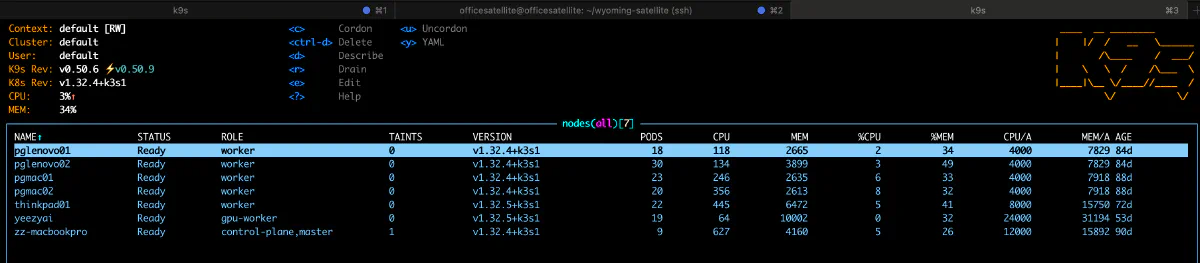
The cluster nodes showing 169+ days of continuous uptime - a testament to Kubernetes stability
Fako Cluster Architecture
Core Architecture Principles
GitOps-Driven Deployment
- FluxCD manages all deployments through Git repositories
- Infrastructure as Code (IaC) approach for all configurations
- Automated reconciliation ensures cluster state matches Git repository
Security-First Design
- External Secrets Operator for secure secrets management
- Integration with AWS Secrets Manager
- SOPS encryption for sensitive configuration data
- Network policies and RBAC for defense in depth
High Availability
- Multi-node cluster configuration
- Persistent volume claims for stateful workloads
- Regular automated backups
- Health checks and auto-recovery mechanisms
Security Architecture
Layers of Security
- Network Level: Cloudflare DDoS protection
- Ingress Level: TLS termination, rate limiting
- Namespace Level: Network policies, RBAC
- Pod Level: Security contexts, non-root users
- Secret Level: External secrets, encryption at rest
Resource Management
Node Types
Master Node
- Control plane components
- etcd database
- API server
Worker Nodes
- General purpose workloads
- CPU-intensive tasks
GPU Nodes
- AI/ML workloads
- GPU-accelerated computing
- Specialized scheduling
Infrastructure Components
The Fako Cluster’s infrastructure is built on a foundation of carefully selected components that work together to provide a production-grade Kubernetes platform. Here’s a comprehensive overview of all components and their roles.
Core Platform
K3s - The Kubernetes Distribution
K3s serves as our lightweight Kubernetes distribution, providing all the power of Kubernetes in a single binary under 100MB. It’s perfect for our homelab environment, offering production-grade capabilities while being resource-efficient. K3s comes with batteries included - Traefik for ingress, Local Path Provisioner for storage, and embedded SQLite for the control plane.
Current Cluster Scale
The Fako Cluster is efficiently running a substantial workload across 6 nodes:
Live Statistics:
- 51 Namespaces: Logical separation for different projects and environments
- 184 Pods: Running containers across all services
- 60 CPU Cores: Combined compute capacity
- 120 GB RAM: Total memory pool
- 2 NVIDIA GPUs: Dedicated AI/ML acceleration
Current Resource Utilization:
| Node | CPU Usage | Memory Usage |
|---|---|---|
| aitower (GPU) | 3% | 15% |
| pglenovo01 | 12% | 34% |
| pglenovo02 | 13% | 33% |
| pgmac01 | 27% | 26% |
| thinkpad01 | 23% | 38% |
| zz-macbookpro | 15% | 47% |
These numbers demonstrate the efficiency of our setup:
- Low average CPU utilization (~15%) shows plenty of headroom for burst workloads
- Moderate memory usage (~32%) indicates efficient resource allocation
- 184 pods across 51 namespaces proves the lightweight nature of containerized workloads
- GPU node at 3% CPU shows AI workloads are GPU-bound, not CPU-bound
This is the power of K3s - running 184 pods across 51 namespaces on heterogeneous hardware while maintaining significant capacity for growth.
Node Architecture
The cluster runs on Ubuntu 24.04 LTS across 6 nodes with specialized roles:
Control Plane (zz-macbookpro)
- Runs K3s control plane components (API server, scheduler, controller-manager)
- Also runs workloads (not dedicated control plane)
- 12 cores, 16 GB RAM
GPU Workloads (aitower)
- Dual NVIDIA GPU configuration for AI/ML workloads
- Runs Ollama, Whisper, and other AI services
- 28 cores, 64 GB RAM, 2x NVIDIA GPUs
Storage Node (thinkpad01)
- Provides local SSD storage for database workloads
- Runs CloudNative-PG PostgreSQL clusters
- 8 cores, 16 GB RAM
General Workers (pglenovo01, pglenovo02, pgmac01)
- Run web applications, automation, monitoring
- Lightweight workloads distributed across nodes
- 4 cores, 8 GB RAM each
Why Resource Allocation Matters
In Kubernetes, proper resource allocation prevents the “noisy neighbor” problem - where one application consumes so many resources that it starves others. By setting resource requests and limits, we ensure:
- Fair distribution of CPU and memory across all applications
- Protection against runaway processes that could crash nodes
- Predictable performance for critical services
- Better cluster scheduling decisions
GitOps & Continuous Deployment
FluxCD v2.6.4 - The GitOps Engine
FluxCD is the heart of our continuous deployment strategy. It watches our Git repository and automatically applies changes to the cluster, ensuring that what’s in Git is always what’s running in production. This includes:
- Source Controller: Pulls configurations from Git repositories
- Kustomize Controller: Applies Kubernetes manifests with environment-specific patches
- Helm Controller: Manages complex applications packaged as Helm charts
- Notification Controller: Sends alerts when deployments succeed or fail
Renovate - Automated Dependency Updates
Renovate automatically creates pull requests when new versions of our dependencies are available. This keeps our infrastructure secure and up-to-date without manual intervention.
Networking Architecture
Network Model
The cluster uses Flannel as the Container Network Interface (CNI), providing:
- Pod networking across all nodes
- Service discovery and internal DNS
- Network isolation between namespaces
- Load balancing for services
Traefik - Ingress Controller
Traefik handles all incoming HTTP/HTTPS traffic, routing requests to the appropriate services. As K3s’s built-in ingress controller, it provides:
- Automatic TLS termination
- Dynamic configuration updates
- Rate limiting and security headers
- WebSocket and gRPC support
Why Ingress Matters
Without an ingress controller, each service would need its own LoadBalancer or NodePort, quickly exhausting available ports and complicating security. Traefik provides a single entry point that intelligently routes traffic based on hostnames and paths.
Service Discovery
Internal DNS enables services to find each other using predictable names. This abstraction is crucial because:
- Pod IPs change when pods restart
- Services can scale up or down dynamically
- Applications don’t need hardcoded addresses
- Cross-namespace communication becomes manageable
Network Policies
Kubernetes Network Policies provide microsegmentation, essential for security because:
- By default, all pods can communicate with each other
- Compromised pods could access sensitive services
- Compliance requirements often mandate network isolation
- Zero-trust architecture requires explicit allow rules
Cert-Manager - TLS Certificate Automation
Cert-Manager automatically provisions and renews TLS certificates from Let’s Encrypt. This automation is critical because:
- Manual certificate management is error-prone
- Expired certificates cause outages
- HTTPS is required for security and SEO
- Wildcard certificates simplify multi-service deployments
External Access
While K3s can expose services directly, your cluster uses:
- Traefik ingress for HTTP/HTTPS routing
- GPUStack Proxy with Cloudflare integration for secure external access
- Service type ClusterIP for internal services
- NodePort only when absolutely necessary
This approach maintains security while providing flexible access patterns.
Storage Solutions
Why Storage Classes Matter
Storage Classes abstract the underlying storage implementation from applications. This is important because:
- Different workloads have different storage needs: A database needs fast, local storage while a media server needs shared storage accessible from multiple pods
- Applications shouldn’t care about storage implementation details: Your app requests “fast storage” or “shared storage” without knowing if it’s NFS, local disk, or cloud storage
- Dynamic provisioning eliminates manual volume creation: When a pod requests storage, Kubernetes automatically creates it based on the storage class
- Storage can be swapped without application changes: Switch from local disk to SAN by just changing the storage class, not your application
Think of Storage Classes like ordering “express shipping” vs “standard shipping” - you specify what you need, not how it’s implemented.
NFS Storage - Shared Persistent Storage
A dedicated NFS server provides shared storage for applications that need persistent data. NFS is ideal for:
- Media files: Multiple pods can read the same video/audio files
- Shared configurations: When multiple instances need the same data
- Legacy applications: That expect traditional filesystem semantics
- Backup destinations: Centralized location for all backups
However, NFS has limitations:
- Network latency affects performance
- Not suitable for databases or high-IOPS workloads
- Single point of failure without clustering
Local Path Storage
Local Path provides high-performance storage tied to specific nodes. It’s perfect for:
- Databases: Where low latency is critical
- Cache layers: That can be rebuilt if the node fails
- Temporary processing: Where data doesn’t need to survive node failure
The tradeoff is that pods using local storage cannot move between nodes, limiting high availability options.
CloudNative-PG - PostgreSQL Operator
Rather than managing PostgreSQL manually, CloudNative-PG provides:
- Automated failover and high availability
- Point-in-time recovery capabilities
- Integrated backup management
- Resource optimization based on workload
Why Persistent Volumes Matter
Containers are ephemeral by design - when they restart, all data is lost. Persistent Volumes ensure:
- Data survives pod restarts and updates
- Applications can be truly stateful
- Backups have consistent data to protect
- Database transactions aren’t lost
K8s-Backup - Comprehensive Backup Strategy
Our backup system protects both ETCD (cluster state) and application data through:
- ETCD backups: Via CronJob for disaster recovery
- PVC backups: Weekly snapshots of all persistent data
- NFS-based storage: Centralized backup location
- Automated scheduling: No manual intervention required
Security Architecture
Security Principles
The cluster implements defense-in-depth security because no single security measure is foolproof:
- Zero Trust: Every request is verified, even internal ones
- Least Privilege: Components only get the permissions they absolutely need
- Encryption Everywhere: Data is protected in transit and at rest
- Immutable Infrastructure: Changes go through Git, not manual modifications
- Audit Everything: Every action leaves a trace for forensics
Keycloak - Identity and Access Management
Keycloak provides Single Sign-On (SSO) for all cluster applications because:
- Managing users in each application is a security nightmare
- Password policies can be enforced centrally
- Multi-factor authentication protects all services at once
- User onboarding/offboarding happens in one place
- Compliance requirements often mandate centralized identity
External Secrets Operator
This integrates with AWS Secrets Manager to pull secrets securely because:
- Secrets should never be stored in Git (even encrypted)
- Rotation becomes possible without application changes
- Access control is managed by AWS IAM
- Audit trails show who accessed what secrets
- Development and production can use different secret stores
RBAC Configuration
Role-Based Access Control provides fine-grained permissions because:
- Not everyone needs admin access to everything
- Compromised accounts have limited blast radius
- Compliance requires demonstrable access controls
- Service accounts should only access what they need
Security Scanning Suite
Kubescape Operator
Continuously scans for security misconfigurations because:
- Security drift happens over time
- New CVEs are discovered daily
- Best practices evolve
- Manual audits miss edge cases
Kube-bench
Runs CIS Kubernetes Benchmark checks because:
- Industry standards provide baseline security
- Automated checks catch configuration drift
- Compliance often requires CIS compliance
- Regular scans maintain security posture
Gitleaks
Scans for secrets in Git repositories because:
- Developers accidentally commit secrets
- Historical commits may contain secrets
- Automated scanning prevents breaches
- Early detection minimizes damage
Observability Stack
Why Observability Matters
You can’t fix what you can’t see. Our comprehensive observability stack ensures:
- Problems are detected before users notice
- Root cause analysis has necessary data
- Capacity planning is based on real metrics
- Performance optimization has baselines
Kube-Prometheus-Stack
This comprehensive monitoring solution includes:
Prometheus - Metrics Collection
With 30-day retention and 50GB storage because:
- Short retention misses monthly patterns
- Insufficient storage causes data loss
- Historical data enables trend analysis
- Troubleshooting needs past context
Grafana - Visualization
Accessible at grafana.landryzetam.net because:
- Raw metrics are hard to interpret
- Visual dashboards speed up diagnosis
- Different teams need different views
- Alerts need visual context
AlertManager
Centralizes alert routing because:
- Different alerts need different responders
- Alert fatigue from too many notifications
- Grouping related alerts reduces noise
- Escalation policies ensure response
Loki-Stack - Log Aggregation
Loki and Promtail work together because:
- Container logs are ephemeral
- Distributed systems need centralized logs
- Correlation across services requires aggregation
- grep doesn’t scale to hundreds of pods
Alloy - Unified Telemetry Collection
Grafana Alloy collects metrics, logs, and traces because:
- Multiple agents waste resources
- Unified configuration simplifies management
- Consistent data collection improves reliability
- Future-proof for OpenTelemetry adoption
GPU Infrastructure
Dual GPU Configuration
The aitower node features two NVIDIA GPUs for AI/ML workloads:
- GPU 0: Primary AI inference (Ollama, LLMs)
- GPU 1: Speech processing (Whisper, Piper)
This separation allows running large language models alongside speech-to-text without resource contention.
GPU Operator - Automated GPU Management
The NVIDIA GPU Operator automates GPU setup because:
- Manual driver installation is error-prone
- Version compatibility is complex
- Multiple components need coordination
- Updates should be automated
GPU Monitoring
Dedicated GPU metrics are essential because:
- GPU utilization affects AI/ML performance
- Temperature monitoring prevents hardware damage
- Memory usage shows optimization opportunities
- Power consumption affects costs
Infrastructure as Code
Every component is defined as code and stored in Git because:
- Reproducibility: Disasters require quick rebuilds
- Version Control: Every change has history
- Documentation: Code is self-documenting
- Automation: Manual processes don’t scale
Currently, all infrastructure is managed through:
- Kubernetes Manifests: Declarative approach to define all deployments and configurations
- Kustomize: Manage environment-specific configurations
- Manual Node Setup: Direct configuration of Ubuntu nodes
GitOps Benefits
Using GitOps with FluxCD provides:
- Single source of truth in Git
- Automatic drift detection and correction
- Rollback is just a Git revert
- Access control via Git permissions
- Audit trail of who changed what
Complete Services Inventory
The Fako Cluster runs 51 namespaces organized by function:
AI/ML Services
| Namespace | Service | Description |
|---|---|---|
| ollama | Ollama | LLM inference server with GPU acceleration |
| ollama-webui | Ollama WebUI | Legacy chat interface |
| open-webui | Open WebUI | Modern AI chat interface |
| whisper | Whisper | Speech-to-text transcription |
| piper | Piper | Text-to-speech synthesis |
| openwakeword | OpenWakeWord | Wake word detection |
Infrastructure & Platform
| Namespace | Service | Description |
|---|---|---|
| flux-system | FluxCD | GitOps continuous deployment |
| cert-manager | Cert-Manager | TLS certificate automation |
| external-secrets-system | External Secrets | AWS Secrets Manager integration |
| nfs-system | NFS CSI Driver | Dynamic NFS provisioning |
| cnpg-system | CloudNative-PG | PostgreSQL operator |
| gpu-operator | GPU Operator | NVIDIA GPU management |
| kube-system | K3s Core | Core Kubernetes components |
Monitoring & Observability
| Namespace | Service | Description |
|---|---|---|
| monitoring | Prometheus/Grafana | Metrics and dashboards |
| loki-stack | Loki + Promtail | Log aggregation |
| alloy | Grafana Alloy | Unified telemetry collection |
| tempo | Tempo | Distributed tracing |
| gpu-monitoring | GPU Metrics | NVIDIA GPU monitoring |
Security
| Namespace | Service | Description |
|---|---|---|
| keycloak | Keycloak | Identity and access management |
| kube-bench | Kube-bench | CIS benchmark scanning |
| kubescape | Kubescape | Security posture management |
| security-scanning | Gitleaks | Secret scanning |
Applications
| Namespace | Service | Description |
|---|---|---|
| n8n | n8n | Workflow automation |
| paperless-ngx | Paperless-ngx | Document management |
| audiobookshelf | Audiobookshelf | Audiobook server |
| blog | Hugo Blog | This website |
| pgadmin | pgAdmin | Database administration |
| oura-dashboard | Oura Dashboard | Health data visualization |
| oura-collector | Oura Collector | Health data ingestion |
| headlamp | Headlamp | Kubernetes dashboard |
Custom Projects
| Namespace | Service | Description |
|---|---|---|
| quantum-trades | Quantum Trades | Trading platform |
| n3xis | n3xis | Manufacturing OEE platform |
| mcp-gateway | MCP Gateway | AI tool gateway |
| audio-compressor | Audio Compressor | Meeting recording processor |
Data & Storage
| Namespace | Service | Description |
|---|---|---|
| postgres | PostgreSQL | Primary database cluster |
| postgres-recovery | PG Recovery | Database recovery tools |
Applications Running on K8S Platform
N8N - Workflow Automation
N8N provides visual workflow automation because:
- Complex integrations need visual representation
- Non-developers need automation capabilities
- Code-based automation doesn’t scale to all use cases
- Visual debugging speeds development
Data Collection & Visualization
- Oura Collector: Automated health data collection
- Oura Dashboard: Custom visualization for health metrics
This demonstrates how the platform supports personal projects beyond traditional IT workloads.
Web Applications
A variety of web applications showcase the platform’s versatility:
- Audiobookshelf: Media server for audiobooks
- Linkding: Bookmark management
- PGAdmin: Database administration
- Wger: Workout tracking
- Blog: Personal website hosting
Kubernetes Management Tools
Headlamp - Visual Cluster Management
Provides a web-based Kubernetes dashboard because:
- kubectl isn’t intuitive for everyone
- Visual representation aids understanding
- Quick actions speed up common tasks
- Mobile access enables on-the-go management
Housekeeping - Automated Maintenance
CronJob-based maintenance tasks because:
- Manual maintenance is often forgotten
- Consistent timing improves reliability
- Automation reduces human error
- Logs provide audit trails
Node Labeling - Automated Configuration
Automatically labels nodes because:
- Manual labeling is error-prone
- New nodes need immediate configuration
- Consistent labels enable proper scheduling
- Dynamic environments need dynamic configuration
Lessons Learned
Building and operating the Fako Cluster has provided valuable insights that can help others avoid common pitfalls:
1. Start Small and Scale as Needed
The Problem: I started with too much capacity - as the statistics show, I’m only using 8% of CPU and 34% of memory.
The Learning: Start with a maximum of 2 nodes and scale only when you actually need it. It’s much easier to add nodes than to downsize. My current setup could easily run on half the hardware.
2. Design Storage Architecture from Day One
The Problem: Not starting with proper storage classes led to painful refactoring and migrations later.
The Learning: Set up NFS and proper storage classes from the very beginning. It’s much harder to migrate stateful workloads than to design for them upfront. Every pod that needs persistent storage should use a well-defined storage class from day one.
3. Start with External Secrets Management
The Problem: While SOPS is great and has its use cases, migrating secrets to a proper vault later is complex.
The Learning: Begin with a solution like AWS Secrets Manager or HashiCorp Vault from scratch. It’s easier to have proper secret rotation and access controls from the beginning than to retrofit them later.
Future Enhancements
The platform is designed to evolve with emerging technologies and better practices:
Infrastructure Management
- Ansible: Automate node provisioning and configuration management
- Terraform: Infrastructure as Code for cloud resources and bare metal provisioning
- Packer: Immutable node images for consistent deployments
Advanced Kubernetes Features
- Service Mesh: Istio or Linkerd for advanced traffic management
- Policy as Code: OPA/Gatekeeper for enforcing best practices
Cluster Operations
This section outlines standard maintenance procedures for the Fako Cluster, including routine tasks, troubleshooting steps, and emergency procedures.
Daily Operations
Health Checks
- check pods health
- check node health
- check flux logs and sync status
Log Review
- Check for any failed pods or containers
- Review ingress logs for unusual traffic patterns
- Monitor resource usage trends
Weekly Maintenance
Backup Verification
- Verify all PVC backups are current
Monthly Tasks
Updates and Patches
- Review container image versions
- Test updates in staging environment
- Apply updates through Git commits
Resource Optimization
- Check resource requests vs actual usage
Best Practices
Change Management
- Always make changes through GitOps
- Document all changes
- Monitor after deployment
Security Operations
- Regular security scans
- Keep secrets in External Secrets
- Use RBAC appropriately
- Monitor for suspicious activity
- Regular security updates
Performance Optimization
- Right-size resource requests
- Use horizontal pod autoscaling
- Monitor and tune as needed
- Regular cleanup of unused resources
- Optimize image sizes
External Resources
- Kubernetes documentation
- CNCF Slack channels
- Vendor support (as applicable)
📚 More Projects
Infrastructure Deep Dives
- GitOps Framework: Repository Structure - How the Fako Cluster repository is organized